Integrate with PayPal Website Payments Pro
You will need a PayPal Website Payments Pro account for this integration. If you need automatic recurring billing for memberships you will also need to signup for Recurring Payments. Note that these services incur monthly fees with PayPal.

PayPal no longer offers PayPal Website Payments Pro accounts, so if you don't already have this type of account, you should integrate with PayPal Expanded Checkout instead.
Step by Step Instructions
Step 1: Obtain Credentials
After logging into your PayPal account, click on the Settings (gear) icon in the top (right) toolbar. Then click on My Selling Tools.
Under API access click Update then click the link under NVP/SOAP API integration (Classic).
Note down the API Username, API Password and Signature.
If you see a Certificate instead of Signature, you will need to delete the certificate (if you are not using the certificate with any other system) and request new API credentials.
Step 2: Setup IPN
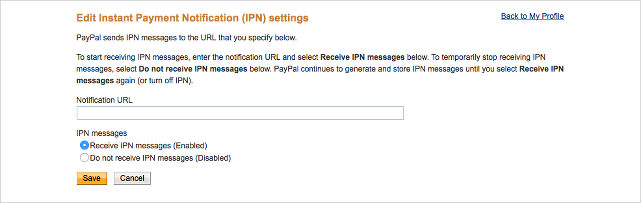
Return to My Selling Tools on the settings page and click on the link under Instant payment notifications.
Click the Choose IPN Settings button.
Enter https://api.membershipworks.com/fi/pay in the Notification URL.
Enable Receive IPN messages (Enabled) and click Save.
Step 3: Add Credentials
Go to MembershipWorks > Organization Settings > Integration > Payments.
Select PayPal Website Payments Pro as the payment gateway.
Enter the API Username, API Password, and Signature.
Click on Click here to test your API settings to make sure the API keys you entered are correct.
Click Save & Continue.
Final Testing
Test your PayPal Website Payments Pro integration by actually signing up as a member on your website. You can always refund your own credit card afterwards. This is the only way to be assured that your signup form works. Make sure the transactions appear on the account timeline and the renewal date is updated correctly after signing up. Please allow 1 business day for automatic recurring billing payments to be processed by PayPal.