Integrate with MailChimp to Email Members
Our email functions are designed for transactional emails. For example, email receipts, email notifications (eg. a change in your Terms of Service), new member welcome emails, renewal notifications, etc. The feature is not intended to be used for newsletters or marketing because there is no way to unsubscribe from the emails - which is required by the CAN-SPAM act for newsletter/marketing emails. If you wish to send newsletters or marketing emails to your members, we would recommend using MailChimp (which we integrate with), Constant Contact, or similar services designed for this function.
Integrate with MailChimp
Note that with our free basic MailChimp integration:
- Old emails will not be removed from your MailChimp audience when a member is removed from the folder/label or updates their email.
- All contacts under the account with the label/folder will also be added to the MailChimp audience.
To connect your MailChimp email audience, you first need your MailChimp API key. If you do not have an MailChimp API key, sign in to your MailChimp account, and go to Account > Extras > API keys to obtain an API key:
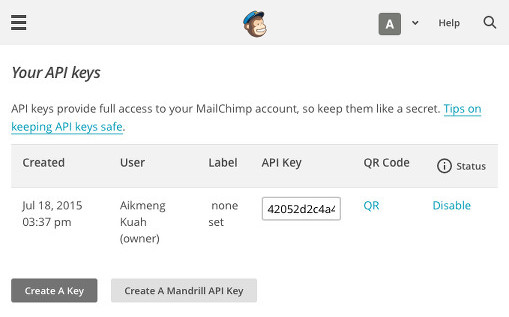
Once you have your MailChimp API key, go to Organization Settings > Lists, and enter your MailChimp API key. You will then be able to select a MailChimp audience and folder or label to connect with the audience.
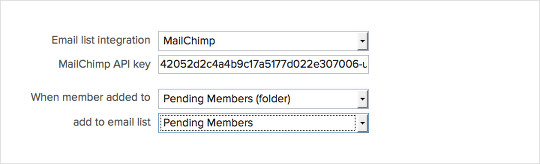
Setup Merge Fields
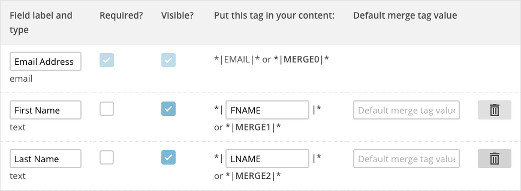
From MailChimp click on your audience and go to Manage Audience > Settings > Audience Fields and *|MERGE|* tags. Ensure that "Required" is disabled for all fields except email address, and that the "FNAME" and "LNAME" merge tags are listed.

Premium MailChimp Integration
Premium MailChimp integration allows you to:
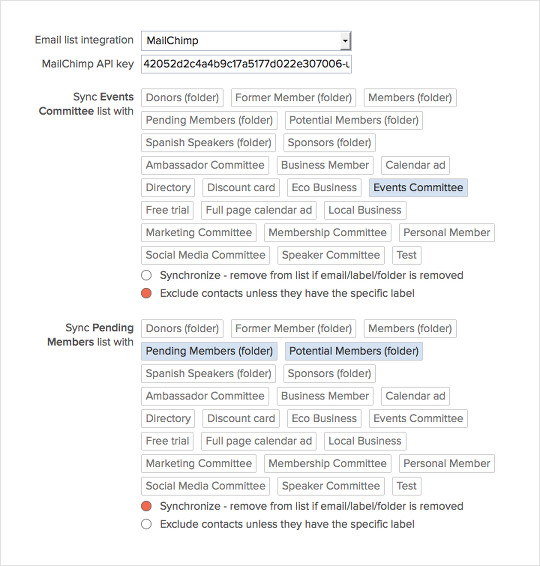
- Connect multiple MailChimp audiences.
- Have an audience connected to multiple folders and/or labels.
- Add labels/folders as tags (see https://membershipworks.com/mailchimp-tags-integration/).
- Option to synchronize audience - remove emails when a member is removed from a folder or label.
- Option to exclude contacts from audience - contacts under an account will not be added to the audience unless they specifically have that label.
- Connect an event or form to a MailChimp audience.
Premium MailChimp is an additional cost service option due to the additional processing load on our servers. To add Premium MailChimp to your account, please go to Organization Settings and upgrade your service plan. Once Premium MailChimp is enabled for your account, you will be able to link all of your MailChimp audiences to your labels/folders under Organization Settings > Lists.
Mailing List Opt Out
We provide a field - "Opt-out from email list" - that can be added to your Member Signup, Member Manage and Admin Profile templates. If this field is set, the member's email addresses will be removed from all your connected MailChimp audiences. Note that each contact on the account has a separate opt-out setting that would have to be set to be removed from the audience.
Allowing Members To Subscribe To Different Audiences
If you are subscribed to our Premium MailChimp integration, you can create labels that are synced to each audience. Then allow members to add/remove the labels themselves on the Member Signup and Member Manage template using the "Add/Remove Labels and Folders" box.