Integrate Our Features into Your Duda Website
You can easily integrate our features into your Duda website by adding our HTML snippets to your website pages.
Where to find the HTML snippets
Snippets can be found under Feature Snippets.

You can only use 1 embed code per page.

- Previews for the pages with HTML snippets may not work properly. Use a different browser (where you are not logged into Duda) to view the actual site.
- HTML snippets for forms/carts/donations and single event registration can be obtained from the respective form or event dashboard.
Step by Step Instructions
Step 1: Create a New Page
Create a new page for your feature in Duda.
You should build a new page for each additional MembershipWorks feature you want to add. You cannot place multiple MembershipWorks code snippets on the same page.
Step 2: Copy Feature Snippet
Step 3: Add HTML Widget
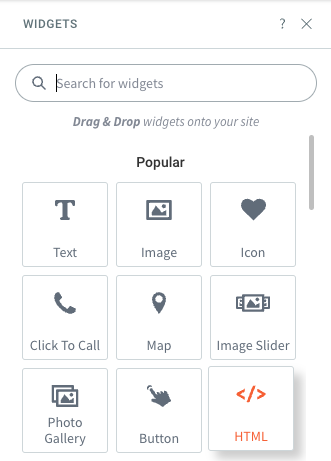
Go to the page editor in Duda and search for the HTML widget.
Step 4: Add HTML Widget to Page Section
Drag the HTML widget into the section of the page where you want it placed.
Step 5: Add Feature Snippet to Widget
Paste the copied HTML snippet into the HTML Content box and click Update.
Step 6: View Your Page
View your page in a separate web browser where you are not logged into Duda.