Erase Personal Data - Right To Be Forgotten
When you anonymize an account, we will:
- Erase all fields in the account and set the Account Name field to "Anonymized"
- Erase all images uploaded for the account
- Erase all secondary contacts for the account
- Erase fields/questions in all linked event/form transactions and set the name of of the registration/checkout to "Anonymized"
- Erase all the Timeline notes, conversations, scheduled/reminder emails, renewal notices, contact change entries
- Erase all messages sent to the member
- Erase all recommendations created/received by the member
- Remove the email address for the member from your connected MailChimp lists
The following information will be retained which provides you with financial records for accounting purposes without retaining any personal information:
- Timeline join date, billing updated, event/form checkout, invoices, payment entries
- Tickets/items, amounts, credit card transaction ID in linked event/form transactions
Do note that if you had entered any personal information in the notes within the payment entries, or with any of the other retained Timeline entries, you will need to erase them manually as we cannot identify such data automatically.
Using The Anonymization Feature
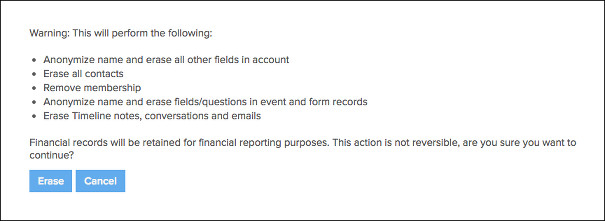
To use this feature, add a "Anonymize/Erase Personal Data" box to the Member Admin template under Customization. You will then see a "Anonymize/Erase Personal Data" button appear under the Profile tab of the member's account. Clicking on the button will bring up a warning before you can proceed with the anonymization process.
Personal Data Stored With Third Parties
MembershipWorks will remove the email address from MailChimp on any connected lists, but we cannot erase personal data from your payment gateway (Stripe, PayPal, Authorize.net, Braintree), accounting software (QuickBooks/Xero), or forums (Website Toolbox). Please check with each provider regarding the steps you will need to take to erase the member's personal data from their system.
Anonymization Vs. Simply Deleting Account
Simply deleting an account does not erase personal data that is stored with linked event or form transactions. If you plan on deleting the account anyway (because you no longer need the financial records), you should anonymize an account first before deleting it.
Erasing Personal Data From Event/Form Records Of Non-Members
If you need to erase personal data from event/form records of a non-member (ie. user without an account), first create an account using the email address of that user. A history of event/form transactions that match that email address will be populated in the Timeline of the created account. Then you can anonymize the account and delete it afterwards.