Customizing Appearance
You are able to customize the appearance of features (e.g., membership forms, members directory and events calendar) on your website and easily tailor the color scheme (e.g., links, buttons, inputs, etc), font size and border radius (roundness) to match your website.
Edit the Appearance of Your Website’s Features
- Go to MembershipWorks > Customization > Appearance.
- Edit the fields as desired. By default, many appearance settings are linked to each other to make developing cohesive themes simpler. For these linked settings, you can uncheck the checkbox to edit the setting directly.
- Click Save Template to save and apply the changes.
Important Note for Custom CSS Overrides
If you have previously added CSS override rules on your website, those CSS rules will continue to override the settings made under Customization > Appearance. If you would like the appearance settings to take effect, you will need to remove the existing CSS overrides from your website.
Dynamic Preview
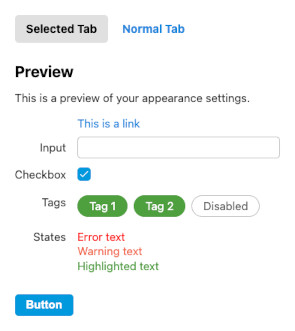
As you edit the appearance settings, you can preview the changes in the Preview area on the right hand side of the screen (if your screen is sufficiently wide) or by clicking the Show Preview button (for smaller screens).
Main Border Radius
The main border radius determines the “roundedness” of the user interface. A border radius of 0 means all boxes (input boxes, buttons, tabs, etc) have 90 degree corners, and increasing the border radius will create rounded corners. By default MembershipWorks attempts to detect the border radius from your website automatically from button elements, but some website themes may not set a radius on buttons. This setting will allow you to set a border radius to match the roundedness of your website theme.
Picking Colors
When adjusting any of the color appearance settings, you can click on the circle within the input box to use the color picker:
For advanced users, you can enter any valid CSS color value in the text input including CSS variables. Note that the preview may not work properly for CSS variables.