Add Our Upcoming Events Widget in WordPress
The event calendar, member directory, member sign up form are all added using shortcodes. But you can also add our Upcoming Events Widget to display upcoming events in any of your sidebars or widgetized areas.
This widget allows you to create a list of upcoming events from your event calendar.
- From the WordPress main menu, navigate to Appearance > Widgets.
- Select and drag the Events widget from the Available Widgets section into the sidebar you want the widget to appear in.
- Enter the event category number (leave blank to display all) to display, and the number of events to show. You can obtain the event category numbers from the event category setup, by clicking on the event category.
- You can adjust whether the widget displays the event image, location, start date/time and end date/time.
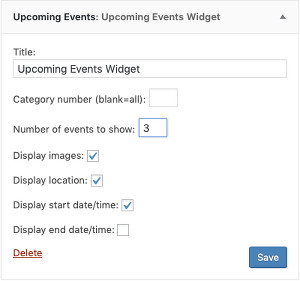
If you do not have a widgetized area to use the widget, you can use the shortcode:

[mw eventwidget]
with the optional parameters:
grp="..." - comma separated list of event categories to pull from (default all)
cnt="3" - number of upcoming events to display (default 3)
lgo="1" - display event thumbnail
szp="1" - do not display event start date/time
ezp="1" - do not display event end date/time
adn="1" - display event location
For example:
[mw eventwidget grp="0,1,2" cnt="5" lgo="1" adn="1"]
will display 5 upcoming events from event categories 0,1 and 2, with event thumbnail, start/end date/times and location.

In order for the widgets to work properly you will need to add the URL of your event calendar and member directory under MembershipWorks > Organization Settings > Website Integration.
The "Event Calendar URL" field should be set to the URL of the page where you have embedded the event calendar/list .
The "Member Directory URL" field should be set to the URL of the page where you have embedded the member directory.