Add our Members/Folder Widget in WordPress
Members / Folder Widget
The event calendar, member directory, member sign up form are all added using shortcodes. But you can also use add our Members / Folder widget to create a slideshow of your members in any of your sidebars or widgetized areas.
This widget allows you to create a slideshow or list of businesses in your members directory, or any other folder - for example, if you want to highlight your sponsors.
- From the WordPress main menu, navigate to Appearance > Widgets.
- Select and drag the Folder widget from the Available Widgets section into the sidebar you want the widget to appear in.
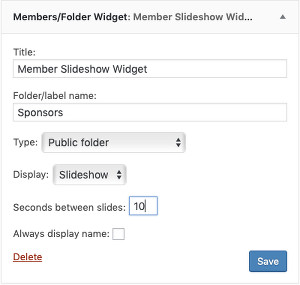
- Enter the name of your folder you want to display the businesses from. Typically this would be your "Members" folder, but you can also set it to any other folder if you make that folder public (see below).
- Choose whether to have the widget display a Slideshow or List. Set the appropriate time between slides if using slideshow.
- By default the widget does not display the name if the member uploaded a logo or headshot to their business card, but you can override this behavior by enabling "Always display name".
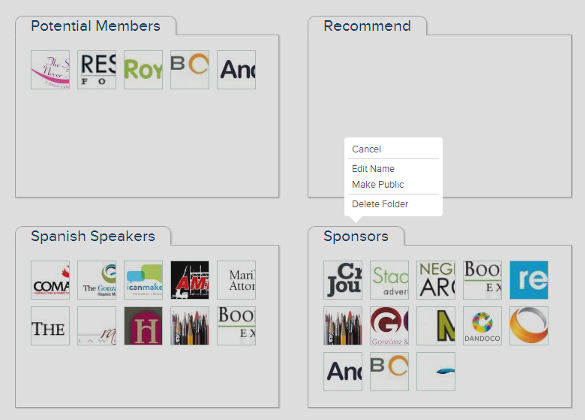
If you are not using your "Members" folder, you will need to make that folder public. Go to Folders, hover over the appropriate folder tab, click on Options, the click Make Public:

with the optional parameters:
typ="..." - 1=display public folder, 3=display searchable label (default "1")
lbl="..." - name of folder/label (default "Members")
act="..." - 0=display list, 1=display slideshow (default 0)
delay="10" - slideshow only - seconds between slides (default 10)
nam="1" - slideshow only - always display name (default is to hide name if member has business card image)
lgo="1" - display business card image
will display a slideshow from the "Members" folder with 5 seconds between slides and name always displayed.